Step-by-step beginner guide: create your account, make your first link, post it safely, and see earnings. Includes live CPM by country + verified payment proofs.
If you’re new to “Shorten URLs and earn money”, this is the clearest step-by-step you’ll find. In the next 10 minutes you’ll: create a free account, make your first link, post it in the right places safely, and understand how payouts work. We’ll also show you where to check live CPM by country and verified payment proofs so you always know what to expect.
New? Start at Signup, then keep this guide open as your checklist.
What you need (free account + basics)

Before you touch publish, lock these 4 basics:
- A free ShrinkForge account
Create yours here → Signup. You’ll get your dashboard, referral link, and stats in one place. All that in less than 5 min to you can start Shorten URLs and earn money. - A clean source of traffic
You don’t need huge followers. Start with small, consistent placements on platforms you already use (YouTube descriptions, Pinterest pins, Reddit comments, your personal blog). - A helpful resource to share
Shorteners work best when your link genuinely helps people. Think checklists, how-to tutorials, download pages, official tools, coupons, or trusted news sources. - A simple plan
We’ll use the “3× daily” method for week one: publish 3 helpful placements per day in spots with real demand (examples below).
Pro tip: New accounts should avoid spammy drops. Focus on relevance, context, and clean formatting. It’s how you build earnings that last.
Create your first link (best practices for titles/anchors)
The mechanics are easy on Shorten URLs and earn money— just paste a long URL → get short link. The difference between $0 and $50/month on the same traffic is how you title, place, and frame that link.
Yeah, that’s just a very small comission from our Shorten URLs and earn money. it means you’re a starter.
A. Pick the right destination
- Use official pages (docs, tools, downloads) or reputable sources.
- If it’s a file/tool, ensure it’s allowed on your chosen platform.
B. Write a benefit-forward title
Your “anchor” (the visible text around your link) should say what the user gets. Use one of these templates:
- Download the PDF Cheat Sheet (Beginner-Friendly, Updated 2025)
- Try the Official Tool (Free, No Signup Required)
- Step-by-Step Tutorial — Works on Windows & Android
- Get the Coupon (Limited, Verified Today)
C. Place your link where the click naturally happens
- On YouTube: top 2 lines of the description + pinned comment.
- On Pinterest: on the first line of your pin description.
- On Reddit: in a helpful comment inside a relevant thread; mention why it helps.
- On your blog: above the fold and again at the end.
D. Add context around the link
Two lines of context can 2–3× CTR:
“I used this tool to compress a 100MB video to 16MB without quality loss. Here’s the exact one I used (no signup): [Short link]”
E. Keep your links tidy
Use one descriptive anchor per placement. Avoid dumping multiple short links in one sentence. If you must include more than one, list them as bullets. this protect the traffic quality high when you work on Shorten URLs and earn money in 2025.
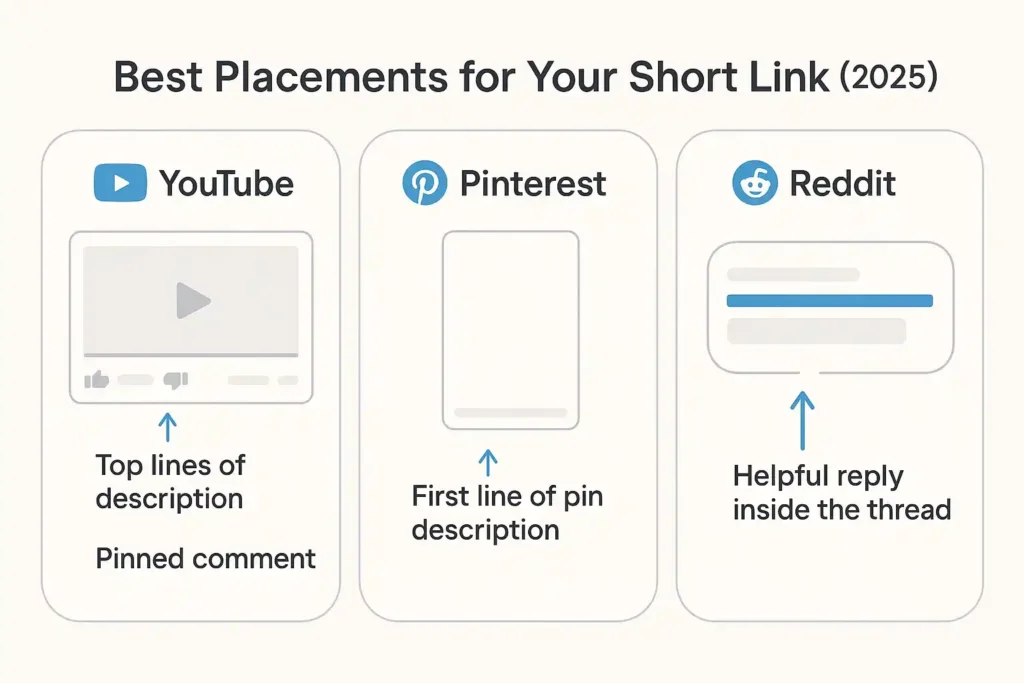
Where to post (YouTube/Pinterest/Reddit/Search)
Not all platforms pay equally for your time. Start where you can be consistent.
This is again a big secrets about a user who get $100+ a day, and who get -$1 a day. (What makes “Shorten URLs and earn money” easily is that you can work on the trending/viral topics and get a huge clicks on your links to convert money per each single click, depend how smart you use the social media free traffic).
YouTube (top ROI for beginners)
Where: Video description (first 2 lines), pinned comment.
What to post:
- Tutorials, “How I fixed ___,” “Tools I recommend,” “Free resources” lists.
- Update old videos that still get views; add your link with a short note: “Update (Oct 2025): This is the tool I use now — faster + free: [Short link].”
Micro-script for your pinned comment:
“Hey! I attached the exact tool I used (free) + a quick setup note so you don’t get stuck on step 2. Link: [Short link]. If it helps, drop a 👍 so others can find it. So everyone can start Shorten URLs and earn money with ShrinkForge”
Cadence: 1–2 updated descriptions per day + 1 new video per week if possible.
Pinterest (surprisingly steady + compounding)
Where: Pin description (first line), board descriptions, profile website.
What to post:
- “Free templates,” “Checklists,” “Meal plans,” “Study guides,” “Design bundles,” “Gaming mod resources.”
- Create 3–5 pins per resource (different covers/captions) and schedule them.
Pin caption template:
“Download the 2025 Starter Template (no signup, free): [Short link] — I use this to plan weekly content in 10 minutes.”
Cadence: 2–3 pins/day for one resource. Repeat weekly.
Reddit (laser-targeted if done respectfully)
Where to Shorten URLs and earn money: Helpful comments and self-posts where value is clear.
What to post:
- Answers to real questions with a short explainer and one helpful link.
- Avoid promotion subs; stick to topic subs (e.g., r/VideoEditing, r/Notion, r/PersonalFinance).
Reply formula (copy/paste):
“This tripped me up too. I solved it by using [tool/guide name] — takes 3 minutes and fixes the exact issue you have. Here’s the guide I followed: [Short link]. Steps 2 & 4 are the key.”
Cadence: 1 genuinely helpful answer/day. Quality > quantity.
Search/Blog (your long-term moat)
Where: Your own blog or Medium profile.
What to post:
- Short step-by-step posts (500–900 words) that answer one exact intent (e.g., “Compress PDF for email without losing quality”).
- Put your short link near the top (once), once in the middle, and once at the end. That’s all you need to Shorten URLs and earn money.
Internal linking: From any post on our blog, link to:
- Payout Rates — to align expectations with live CPM by country.
- Payment Proofs — to build trust with new readers.
- FAQ — to handle objections, rules, and policy comfort.
First-week checklist (3 posts/day)
Use this exact plan to generate your first clicks and data:
Day 1: Shorten URLs and earn money (Setup)
- Create your account → Signup
- Pick one niche you actually understand (saves time)
- Make your first short link with a benefit-forward title
- Draft 3 placements (YouTube update, 1 Reddit reply, 1 Pinterest pin)
Days 2–6: Shorten URLs and earn money (Consistency) — publish 3/day
- Update 1 YouTube description or post 1 new video with your link
- Post 1 helpful Reddit comment (avoid self-promo tone)
- Publish 1–2 new Pinterest pins for the same resource
- Log results nightly (clicks, RPM/CPM, what got engagement)
Day 7: Shorten URLs and earn money (Review)
- Check your dashboard stats (CTR, CPM by country)
- Review Payout Rates and match your content to top GEOs
- Skim Payment Proofs for motivation and timing
- Create a second short link for a new but related resource (diversify!)
Mini-goal: 21 placements published by the end of week one. That’s enough to see patterns and double down.
Learn more: Wikipedia’s article on URL shortening
How payouts work
Earnings depend on impressions by country, ad performance, and platform rules. To keep expectations realistic and plan smarter, always check:
- Live CPM by country on our Payout Rates page.
- Latest payment screenshots on Payment Proofs (we update these so you can verify pacing).
- Methods & frequency: We support multiple methods (PayPal/Payoneer/bank/crypto). Schedules vary by total earned and method; details are summarized on FAQ.
Tips to get paid faster (legit):
- Focus on Tier-1 GEO traffic when possible, but don’t ignore Tier-2 niches with consistent queries.
- Use clear anchors that match the destination (no clickbait).
- Avoid prohibited traffic (bots, incentivized clicks, adult where not allowed). See FAQ for policy highlights.
Safety, compliance & “don’ts”
- Do not share anything you don’t have rights to. Link to official pages/tools whenever possible.
- Do not mislabel a link (e.g., saying “direct download” if it’s a blog post).
- Do not spam identical comments across threads; personalize each placement.
- Do keep records (where you posted, date, link text). It helps you scale what works and prune what doesn’t.
Example: turn one long link into 5 steady placements to Shorten URLs and earn money
Resource: Official desktop cleaner tool (free).
Short link title: Free Desktop Cleaner (1-Click — Official)
Placements (copy/adjust):
- YouTube description:
“I cleaned 12GB in 2 minutes using this official tool (free): [Short link]. If you’re stuck on step 2, see notes above.” - YouTube pinned comment:
“Update (Oct 2025): Still using this. Here’s the exact page: [Short link].” - Reddit reply (in a relevant thread):
“This solved the slow boot for me. Free tool, no signup: [Short link]. Steps 2 & 4 matter most.” - Pinterest pin caption:
“Declutter your PC in 2 minutes — 2025 method (free): [Short link]” - Blog post intro CTA:
“Shortcut first? Grab the official tool: [Short link]. Full tutorial below.”
Repeat this structure for each resource you share.
Troubleshooting low earnings (quick fixes)
- Clicks but low payout: Your traffic may skew to lower-CPM GEOs. Reframe content for GEOs with stronger CPM (see Payout Rates).
- Few clicks: Your anchor isn’t benefit-focused. Replace “Click here” with “Download the 2025 Template (free).”
- Moderation issues: Re-read the platform rules. Some subs ban short links in titles; use comments or self-posts with context.
- CTR good, but low retention: Ensure the destination matches the promise. Remove any friction you control (add directions, screenshots, or a 1-line setup tip).
Read more: How to Increase CPM on URL Shorteners
FAQ
Is this beginner-friendly?
Yes. If you can write two helpful sentences and paste a link, you can start today. Use the 3× daily plan for your first week.
How soon can I get paid?
It varies by method and threshold. Check FAQ for current thresholds, and see recent Payment Proofs for timing.
Which countries pay the most?
This changes with advertiser demand. Always check the latest live CPM by country here: Payout Rates.
Can I use referral links too?
Absolutely. Mention the referral bonus clearly (e.g., “Sign up and earn with a $1 bonus”). Keep it transparent and helpful.
What traffic is not allowed?
No bots, forced clicks, fake traffic, or misleading placements. More details on FAQ. When in doubt, ask support before posting.
Your next 30 minutes (do this now)
- Create your account → Signup
- Make one short link for a helpful resource you actually use
- Publish three placements:
- Update one YouTube description or pin a comment
- One helpful Reddit reply
- One Pinterest pin
- Check Payout Rates to match your next topic to high-demand GEOs
- Save this guide. Repeat tomorrow.
You don’t need magic. You need consistency + clean placements. Do that for 7 days and the data will tell you where to scale.
Now you have every tool and strategy to shorten urls and earn money—start today and turn your traffic into payouts with ShrinkForge.